
How do you walk into every call already caught up?
Your 2pm is someone you haven't spoken to in a year, and at 1:55 you're still digging through old threads to remember what you promised. Now the catch-up is in your inbox before breakfast.
 Chris Battis
Meeting prep is a YouSpot agent that reads your calendar at 7 each weekday morning and looks up every outside person you're meeting in your mail and your network, going to the web only for people you have no history with. You get one email in meeting order with what you last discussed with each of them and what's still open, and no email on days without outside meetings.
Meeting prep: Your 2pm with Nadia, and 3 more today
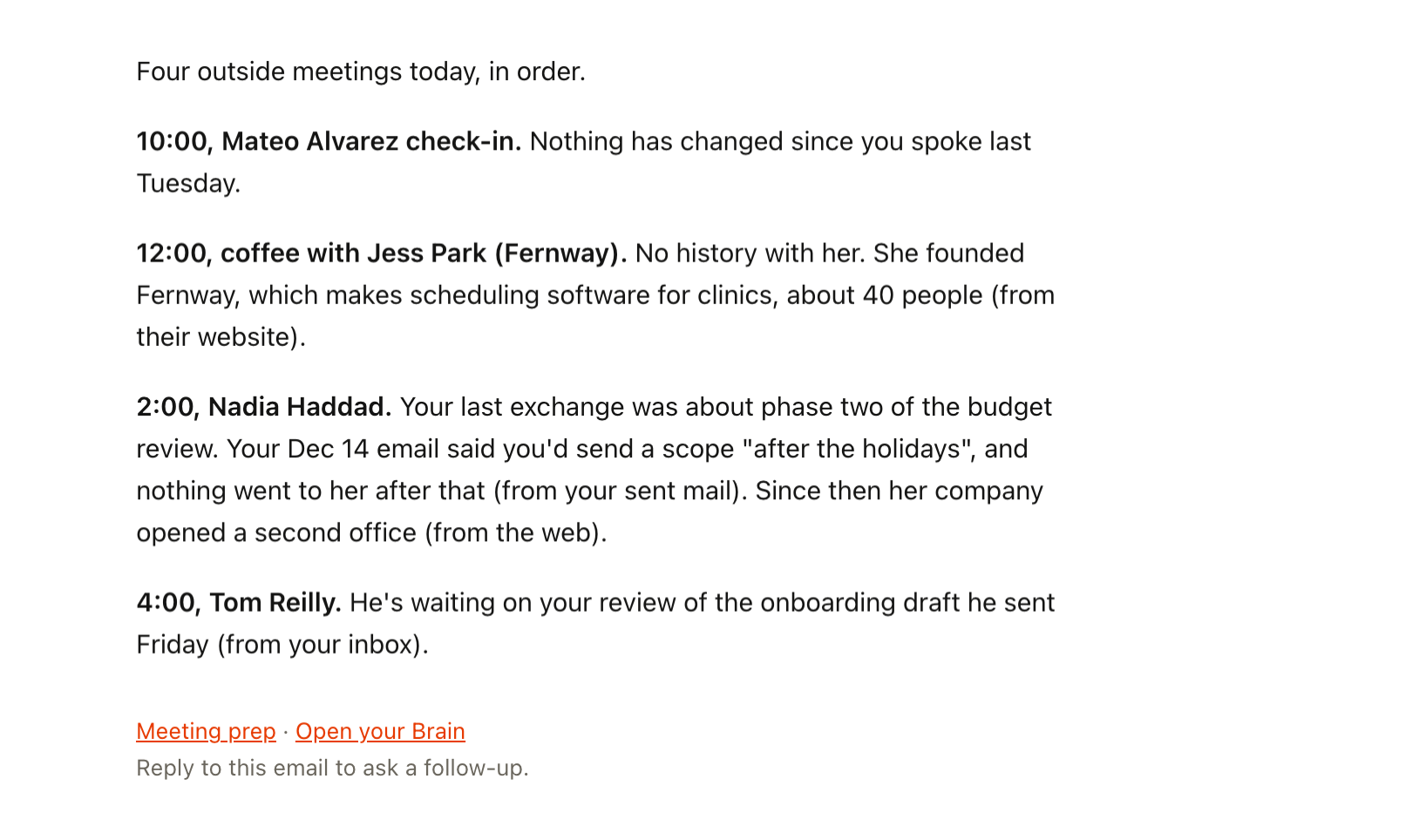
That line opens a short email that arrives at 7 on a weekday morning, with a section for each outside meeting on your calendar that day.
Two minutes late to the call with Nadia
Tuesday brings four calls: Mateo Alvarez, a current client, at 10, coffee at 12 with Jess Park, a founder you've never met, Nadia at 2 and a check-in with Tom Reilly at 4.
Nadia is the one on your mind. You worked together on a budget review last year, and at the end she asked about a second phase that never got scheduled. You remember liking the work. You don't remember what you told her about phase two, or whether it stalled on her side or yours.
At 1:50 you're typing her name into your inbox search, scrolling past calendar invites and a long thread about an invoice. You find the last real email at 1:58. It's yours, and it says you'd send a scope "after the holidays," which you never sent. You join two minutes late and spend the start of the call working out where you left off, out loud, in front of her.
She's gracious about it. But she works at a company many times the size of yours, and for those first few minutes you looked like someone who can't keep track of their own clients. When she decides who to bring in for phase two, that call is part of what she remembers. You won't hear about it either way.
This is how the calendar goes when you run things alone. Busy stretches come, then quiet ones, and people from a year ago land back in your week with a day's notice. The record of what you said to them lives in your sent mail and your memory, and on a day with four calls there's no time to go through any of it.
You join two minutes late and spend the start of the call working out where you left off, out loud, in front of her.
Fifteen minutes of prep the morning always eats
You've tried to get ahead of this. A notes doc for each client, which you stopped updating after the second project. Fifteen minutes blocked before every call, which is the first thing to go when the morning runs over. A CRM that wanted a note logged after each conversation, which turned into one more job after the last call, so the notes stopped. And searching your inbox in the minutes before a call, which is how you ended up at 1:58.
Every one of them asked you to do the prep on the days you have the least time for it.
Tuesday at 7, every call has its notes
Today has four outside meetings, so Meeting prep sends an email. On a day with only internal calls it sends nothing.
Before you're up, the agent has read your calendar and looked up each person you're meeting in your network and your mail. It has found your last exchange with Nadia, the one about phase two, and the line in your own email promising a scope after the holidays. It has checked the web for Jess, because you have no history with her, and noticed that Nadia's company has opened a second office.
At 7 it sends one email, in the order of your day. Mateo gets a single line: nothing has changed since you spoke last week. Jess gets a few lines on who she is and what her company does, marked as coming from the web. Tom gets two lines on the draft he's waiting for you to review. Nadia's section is the longest, and each line says where it came from, so you can open the thread if you want to check.
You read it over coffee. At 2 you join on time and open with the scope you owe her, and the conversation picks up where the last one ended.
By the end of the month, the calendar reads as a list of people again, and the ones you haven't seen in a year get the most room in the brief, because they're the ones your memory has let go of. The prep time you used to block and never use goes back to the work. What you say on the call is still up to you.
What should you know before a client call?
Two things: what you last discussed, and what's still open between you. For Nadia that was phase two and the scope you promised after the holidays, and both came from your own sent mail. Meeting prep's instructions skip solo blocks, reminders and internal meetings, so only a call with someone from outside your business gets a section. If someone new emails you before you ever meet, the post on how to find out who an unknown sender is covers the agent for that.
- When: Weekdays 7:00
- First: Looks up everyone you're meeting
- Then: Finds what's still open
- What lands: One email on days with outside calls
What Meeting prep reads before your day starts
Every weekday morning, Meeting prep reads your calendar, finds the meetings with people outside your business, and looks up what you already know about each of them. Then it sends you one email that covers the whole day, in meeting order. It's the agent behind YouSpot's what's the latest with this client? page.
- Google Calendar
- Gmail
- Your YouSpot network
- The web
- Reads
- Your Google Calendar, your Gmail, your network in YouSpot, and the web for people you've never met
- Runs
- Weekday mornings at 7
- Leaves you
- A catch-up on everyone you're meeting, in one email, only on days with outside meetings
How it builds the brief
- Reads today's calendar and skips solo blocks, reminders and internal meetings. Only meetings with outside attendees count.
- For each attendee, checks your network and your mail for who they are, what you last discussed and what's still open.
- Looks up their role and company from what's in your network.
- Searches the web only for people you have no history with, or for real news about their company.
- Gives the most room to the people you haven't seen in a while. The client from yesterday gets one line; the person from a year ago gets the full catch-up.
- Sends you one email, ordered by meeting time, with one short section per meeting.
The brief lands in your inbox, and each morning's run is listed on the agent's page in YouSpot, so you can look back at what it told you before last week's calls.
It only ever writes to you
- It doesn't contact anyone on your calendar. The email comes to you and nobody else.
- On a day with no outside meetings, you get no email.
- If it doesn't know someone, it says "unknown." It never makes up a history you don't have.
- It runs only because you switched it on. If you're away for a week, pause it from its card and the briefs stop until you're back.
Get tomorrow's brief
- Sign in at youspot.com.
- Connect Gmail and Google Calendar.
- Open Agents and pick the Meeting prep card.
- Click Try it once to brief you on today's meetings now. The email arrives in your inbox within a few minutes. If today has no outside meetings, nothing comes, and the agent is working as it should.
- Click Keep it running every weekday to keep it on. After that it lands at 7 each weekday morning.
Once YouSpot is connected to Claude or ChatGPT, you can also type "Prep me for today's calls" in the chat you already have open and get the same catch-up there. How to connect YouSpot to Claude takes a couple of minutes.
Tune the brief to your calls
The instructions are plain English, and you can change them in the edit box on the agent.
If you like to go into a call with a plan, add a line at the end: "End each meeting's section with one question I should ask." Each section then closes with a question drawn from what's still open, like "Is phase two still on the table?"
If you work closely with subcontractors and want those calls covered too, change "and anything internal" to "and anything internal, except calls with my subcontractors." Those calls will get a section as well.
Meeting prep
Weekday mornings at 7. See every agent on the use cases page.