
How do you keep an eye on one company without checking it every week?
You find out months late that the company you most wanted to work with opened an office and hired someone else to launch it. One name, watched across LinkedIn, X and the web, and you hear about it the week it moves.
 Chris Battis
Watch a company, brand or person is a YouSpot agent that checks the web and LinkedIn posts every Monday at 8 for anything new about one name you give it. When something has changed, you get one email saying what moved and which people in your network it touches, and on weeks when nothing has, you get no email.
Watch Northgate: Northgate opened a Denver office
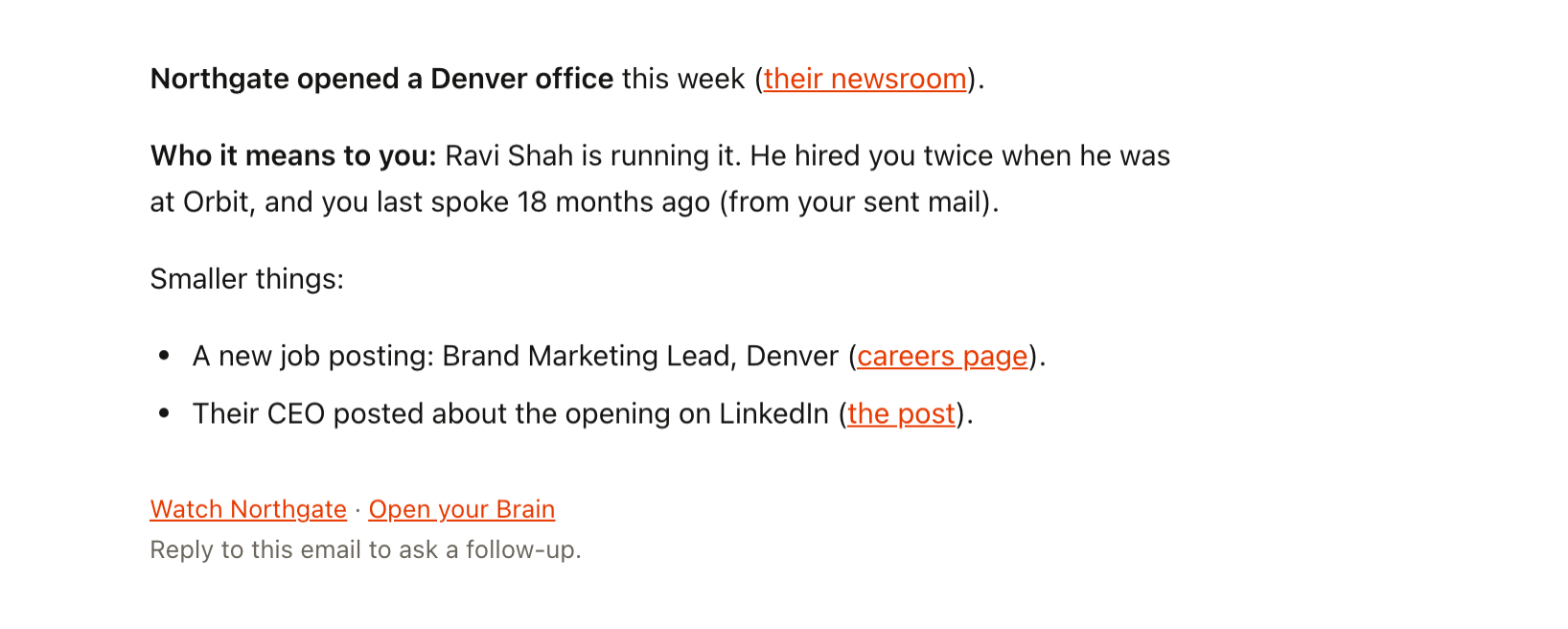
It arrives on a Monday at 8, and on most Mondays there isn't one at all.
The office Northgate opened without you
You're an independent brand consultant, and there's one company you'd love to work with: Northgate. You gave a talk at their offsite two years ago and you know two people there. Every few weeks you mean to look them up.
When you remember, it's twenty minutes of tabs. Their LinkedIn page, a news search, the careers page, a search on X. Most weeks nothing has changed, so by the end of the summer you've stopped checking.
In March you're at a dinner and someone mentions, in passing, that Northgate opened a Denver office in the autumn and brought in an outside agency to launch it. The person running that office is Ravi, who hired you twice at his last company. You haven't spoken in a year and a half. You feel it land, and you spend the rest of the evening half listening.
Missing it costs you more than one project. Nobody at Northgate turned you down. They needed help in October, the agency they knew was there, and you weren't. Ravi still thinks well of you, but nothing had brought you to mind lately, and by March the launch is done and the budget is spent. The next time you write to him, you're writing to say congratulations on something that's six months old.
It fits a pattern you already know. Work comes in busy stretches and quiet ones. You look around for the next project when the current one ends, and by then the news that mattered is old. Keeping up with the companies you'd like to work with is business development, and it's the first thing to go when a client needs you this week.
They needed help in October, the agency they knew was there, and you weren't.
An alert loud enough that you mute it
You've tried a few things. A news alert on the name, which fills your inbox with every passing mention until you mute it. A bookmark folder of their pages that you open less every month. A calendar reminder that says "check Northgate", snoozed until it stopped meaning anything. Following their company page, where the one post that mattered went by in a feed of hundreds.
Each of them leaves you to do the reading every week, for a name that changes a few times a year.
The Monday in October when Northgate moves
Rewind to the autumn, with Watch a company, brand or person running on Northgate.
You set it up in September and forgot about it. Most Mondays it sends nothing.
Then, one Monday in October, something moves. The agent sees Northgate's team page change and a dated news item about a Denver office. It searches your network for anyone tied to it and finds Ravi running the new office. He hired you twice at Orbit, and you last spoke eighteen months ago. It also picks up a new job posting and a post from their CEO.
At 8 there's one email. The first line: Northgate opened a Denver office. The second: Ravi, and what he means to you. Underneath are the two smaller items, each linked to where it was found.
It doesn't write a note for you. You write three lines to Ravi yourself before your first call: congratulations on Denver, and you'd be glad to catch up while he's getting the office started. Whether Northgate needs outside help is their decision. You're writing while the office is still new, and Ravi hears it from you.
You stop opening the tabs. A Monday with no email means the watch ran and nothing moved. When something does, you hear about it the week it happens, along with the people you know who are tied to it.
How do you keep track of a company you want to work with?
Watch for the few changes that mean they might need help, like a new office or new leadership, and know who you know there when one happens. Watch a company, brand or person checks Northgate every Monday at 8, and its instructions count only items dated since its last run, so an old bio or staff page never shows up as news. When something moves, it looks through your network for the people tied to it, which is how Ravi came with the Denver office.
- When: Monday 8:00
- First: Checks what changed
- Then: Finds who it means to you
- What lands: One email only if something moved
What Watch a company, brand or person does
Watch a company, brand or person keeps an eye on one name you give it and tells you only what's new since the last run. Then it looks through your network for the people the news touches.
- X
- The web
- Reads
- LinkedIn posts, X posts, the web, and a page you point it at
- Runs
- Weekly, on Monday mornings at 8
- Leaves you
- What changed and who it means to you, in one email when something moved, and nothing when it didn't
Where it looks
- Searches LinkedIn and X for new posts that mention the name, and skips any it has already shown you.
- Searches the web for anything dated since the last run. Undated pages, like a bio or a staff list, don't count as news.
- Checks whether anything moved. For a person, it takes a fresh look at their LinkedIn. For a company, it checks the page you gave it, such as their team or careers page, and reports only the changes you asked about.
- Looks through your network for people tied to what changed, such as someone who works there or who introduced you, and says when you last spoke.
- Emails you what changed in one line, then who it means to you, then the smaller things.
What it finds is saved in YouSpot under the agent, each item linked from the email, so the Denver news is still there when you want it in three months.
It tells you who, and leaves the message to you
- It won't write the message for you. It tells you why now and who, and you decide what to say.
- If nothing new happened, you get no email, not even an all-clear. Most weeks are like that.
- It won't report the same thing twice. If it showed you a post or a page last week, it stays out of this week's email.
- It watches only because you turned it on. Pause it from its card when Northgate stops mattering, and it stops looking.
Pick the one name to watch
- Sign in at youspot.com. There's nothing to connect first.
- Open Agents and pick the Watch a company, brand or person card.
- In the instructions, replace YOUR SUBJECT with the one name you want watched. For a person, add their LinkedIn if you have it.
- Choose Try it once to see this week's picture now, or Keep it running weekly for Monday mornings at 8.
A try-once run lands in your inbox within a few minutes, if there's anything to say.
If you're in Claude or ChatGPT when a name comes up, connect YouSpot and ask "Tell me about Northgate, and who I know there" without leaving the chat. Here's how to connect YouSpot to Claude.
Sharpen what it sends
Replacing YOUR SUBJECT is the one edit you have to make. These two are optional, and they make the email sharper.
Point it at the page that would change first. After "whichever I gave you," add "Watch northgate.example/careers, and tell me about any role with brand or marketing in the title." A new hire in your field can be the first sign they're about to need outside help.
Tell it what counts. After "report only what I asked you to watch for," add "Watch for new offices and new leadership." The smaller page changes stay out of the email.
Watch a company, brand or person
Weekly, on Monday mornings at 8. See every agent on the use cases page.