
Which LinkedIn posts do you have the best answer to?
An old client asks a question on LinkedIn that you've answered for years, and you scroll past because a proposal is due. Now the comment is drafted before you've had coffee.
 Chris Battis
Posts worth joining is a YouSpot agent that searches LinkedIn each weekday morning for recent posts on the subjects you can speak to, with people you know and have gone quiet with at the top. You get one email at 7 listing the posts, each with a comment drafted in your voice and a link straight to it.
Posts worth joining: Yusuf asked how people price discovery calls
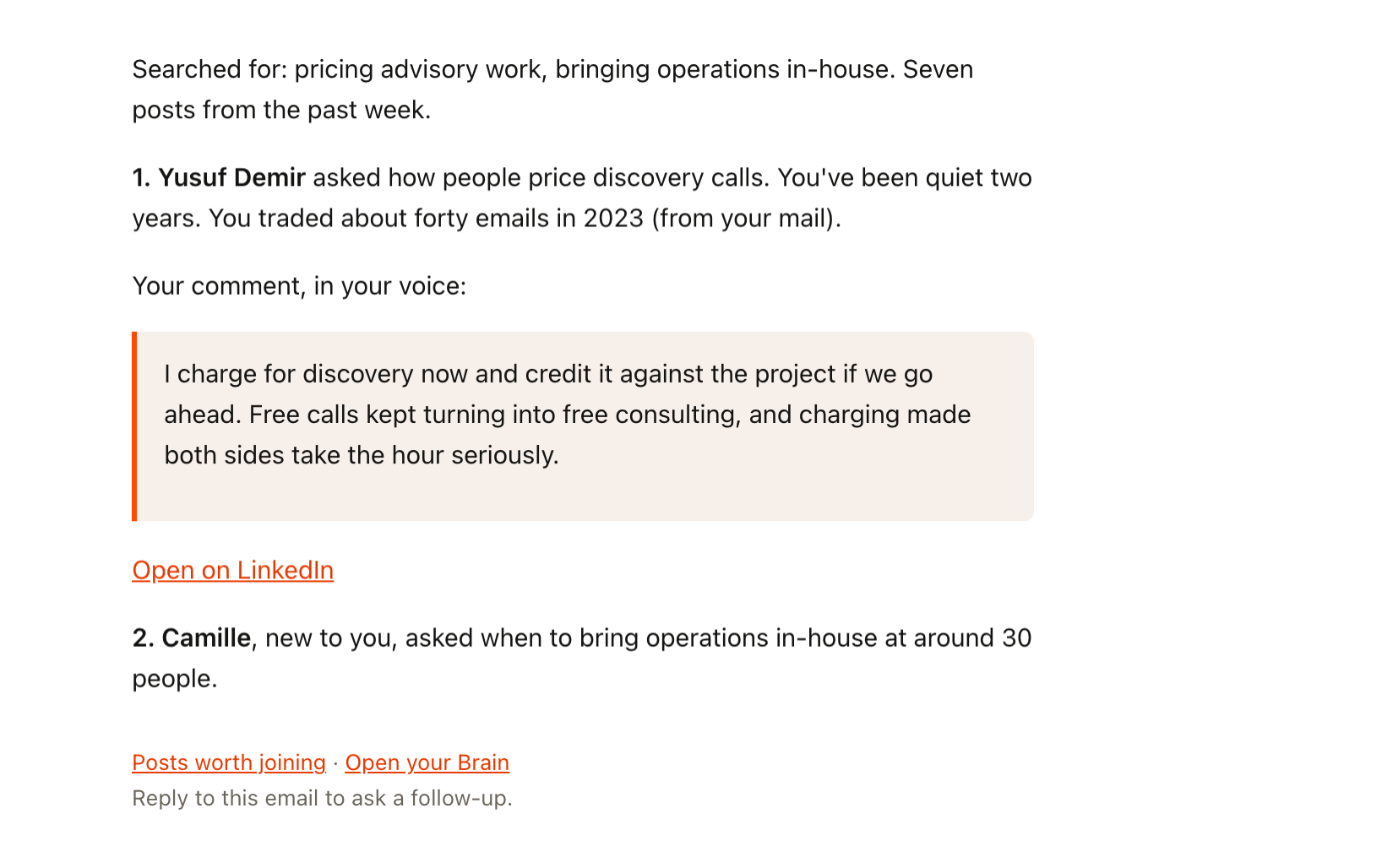
That's the top entry in an email that arrives at 7 on a weekday, with the comment already drafted underneath it.
Yusuf's question, and the morning you scrolled past it
A proposal is due by noon on a Wednesday in March. You open LinkedIn for thirty seconds to answer a message, and on the way you pass a post from Yusuf. He hired you in 2023 and you haven't spoken since. He's asking how people price discovery calls.
You have opinions on that. You've changed how you price them three times, and you could explain why in two sentences. You think "I should say something," and then the proposal pulls you back.
On Friday you remember and go looking. The post has sixty comments now, and adding yours at the bottom would feel like arriving after everyone has left. You close the tab.
That habit has a cost you don't notice. Yusuf read every comment on his own question, and your name wasn't there. The people reading that thread were the kind who hire someone like you, and they saw other people's answers. One of them may already have sent a message to the person whose comment was best.
Being visible is part of how new work finds you, and it's the part many people running a business on their own resent. It feels like marketing, and it competes with the paid work that's due today, so it gets pushed to "when things calm down". Then a project ends, and you wish more of the people you used to work with had seen your name lately.
Yusuf read every comment on his own question, and your name wasn't there.
Notifications buried the posts you cared about
The obvious fixes don't hold. Saving posts to come back to, and never opening the saved list. Blocking twenty minutes on Friday for LinkedIn, which turns into scrolling. Turning on notifications for people you care about, which buried the posts that mattered under everything else they liked. Writing your own posts on a schedule, which lasted two weeks.
All of them hand you the whole feed and leave you to find the right post and write the reply, on mornings you'd planned for client work.
Wednesday at 7, Yusuf is first on the list
Suppose Posts worth joining had been on that Wednesday. On a morning when nothing new turns up on your subjects, there's no email.
Before 7 this morning, the agent has worked out your subjects from what you've posted and who you know: pricing advisory work, and bringing operations in-house. It has searched the past week's posts on both and dropped the crowded threads and the job ads. Then it has checked the authors against your network. Yusuf's question goes first, because you've been quiet two years and traded about forty emails in 2023. Then it has read your own recent posts and drafted a two-sentence comment in your voice on how you price discovery calls now and what made you change.
At 7 the email arrives with seven posts. The first line names the subjects it searched. Under Yusuf's name are one line on what he asked, the comment, and an "Open on LinkedIn" link straight to his post. Further down are two strangers asking questions in your area, marked as new to you.
You change one word, tap the link and post the comment yourself, and the proposal still gets your morning. You save one of the strangers for lunch.
Yusuf may reply that afternoon, or not at all. Either way, he has seen your name under his question, and so has everyone else reading it.
No morning goes on hunting the feed for a post worth answering. You leave a comment or two a week where you actually have something to say, and old clients start seeing your name again without you having blocked an hour for it.
Which LinkedIn posts should a consultant comment on?
Posts asking a question you have a real answer to, especially from people you've worked with and gone quiet on. Yusuf's question about pricing discovery calls was both. Posts worth joining searches only the past week's posts, as its instructions set, and favours an open question over an announcement, so you're answering while the thread is still live. If you'd like your own posts drafted too, the LinkedIn manager post covers how often a consultant should post on LinkedIn.
- When: Weekdays 7:00
- First: Finds posts on your subjects
- Then: Drafts each comment in your voice
- What lands: One email only if there's something new
What Posts worth joining finds
Posts worth joining finds recent LinkedIn posts where you'd add something the thread doesn't already have, and drafts the comment you'd leave. It puts the people you know and have gone quiet with at the top, because a good comment there is also a reason to reappear.
- Reads
- LinkedIn posts, your own recent LinkedIn posts, and who you know
- Runs
- Weekday mornings at 7
- Leaves you
- The posts worth joining, people you know first, each with a comment drafted in your voice and a link to open it, in one email
How it works out what you can speak to
- Works out what you can speak to from what you've published, who you know, what you've been reading and your profile. You don't hand it keywords.
- Searches LinkedIn for new posts on each of those topics from the past week, and skips anything you've already seen.
- Keeps only the posts where you'd add something. An open question beats an announcement, and it passes on crowded threads, job ads and bait.
- Checks the authors against your network and orders them: people you've gone quiet with first, then people you're in touch with, then strangers worth meeting.
- Reads your own recent posts so the drafts sound like you, then writes one short comment per post, usually five to ten on a normal morning. Each one says something specific. It doesn't open with praise or mention what you sell.
- Emails you the list, naming every topic it searched so you can correct it.
Every post it finds is saved in YouSpot under the agent, so Yusuf's question is still there next week if you didn't get to it.
Nothing gets posted without you
- It doesn't post anything for you. It drafts each comment for you to paste and post yourself, or skip.
- If nothing new turned up, you get no email.
- Knowing the author doesn't get a post onto the list. A stranger asking a good question about your work makes it, and a friend posting about something outside it doesn't.
- It runs because you turned it on. Pause it from its card on a week you're off LinkedIn, and nothing arrives until you switch it back on.
See tomorrow's posts
- Sign in at youspot.com.
- Connect LinkedIn.
- Open Agents and pick the Posts worth joining card.
- Choose Try it once to run it now, or Keep it running every weekday to get it each weekday at 7.
On a try-once run, the email lands in your inbox within a few minutes. If it can't tell what you work on yet, it says which sources came back empty and asks what you want watched.
If you would rather ask than wait for 7, connect YouSpot to Claude or ChatGPT and type "What conversations are happening on LinkedIn that I should be part of?" and the chat does the same search. Here's how to connect YouSpot to Claude.
Point it at your topics
The instructions are yours to edit, in plain words.
If five to ten drafts is more than you'll use before 9am, find the sentence that starts "Draft the comment I would leave for every post that survived" and replace it, down to "three feels like enough", with "Draft the comment I would leave for the three best posts." It picks the three where you have the most to add, and drafts those.
If meeting new people is the whole point for you right now, find the line that starts "stranger: still worth my time" and move it above "dormant". New rooms come first, and the old clients follow.
Posts worth joining
Weekday mornings at 7. See every agent on the use cases page.