
How to chase an invoice without it being awkward
Asking a client you like to pay you feels like nagging, so the invoice sits and the silence gets harder to break. On Monday morning, the note is already written in your words.
 Chris Battis
Invoice follow-ups is a YouSpot agent that reads your sent mail every Monday at 8 for invoices whose stated terms have run out with nothing back on the thread. You get one email listing up to three of them, each with the date it went out, and a follow-up written in your voice for the top one or two.
Invoice follow-ups: INV-2231 to Priya, nothing back since Aug 12
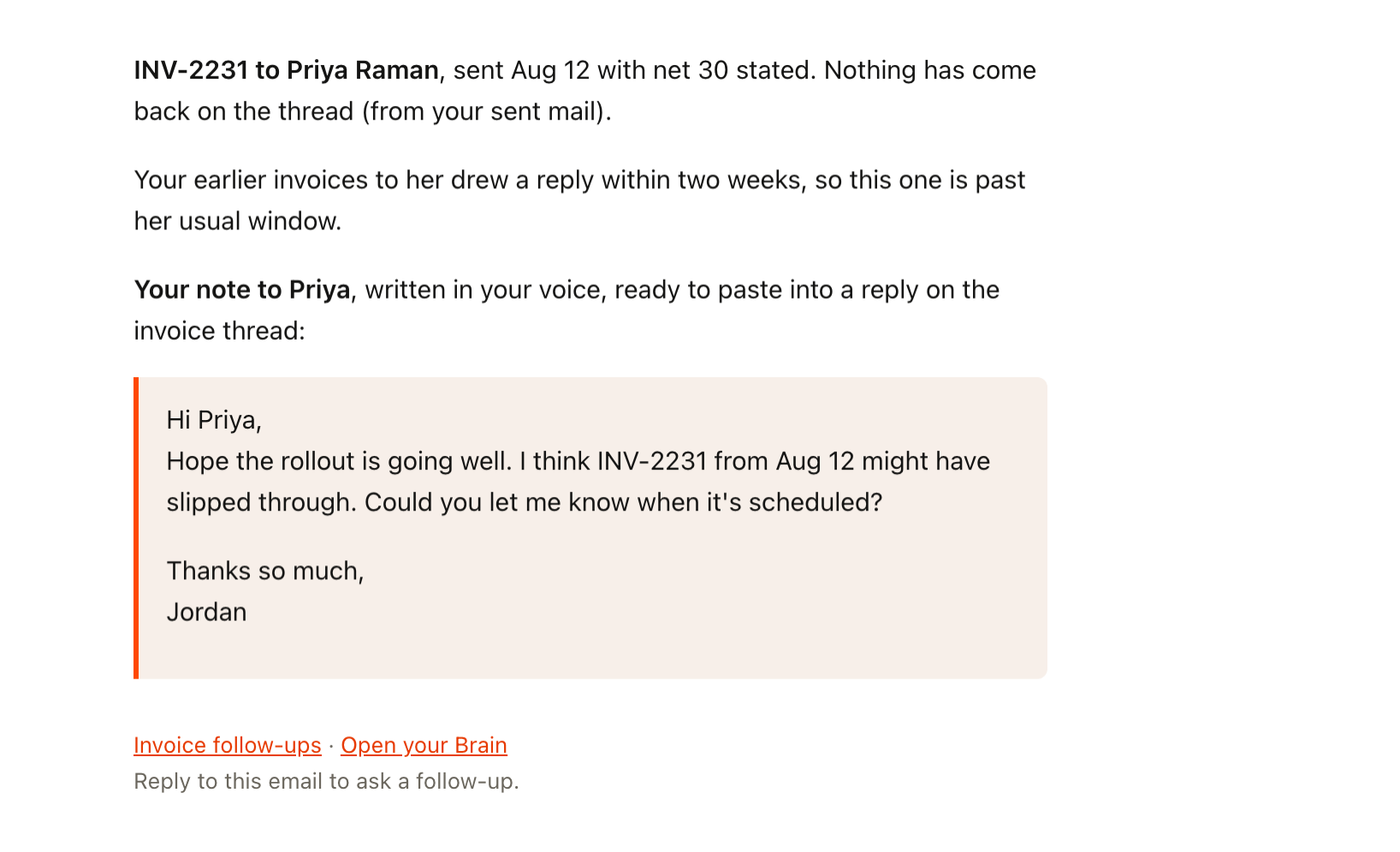
That's the whole email. It lands on the Monday after the terms ran out, at 8.
The invoice you keep not asking Priya about
Priya is a good client. This was your third project together, it finished clean, and she sent a kind note at the end. You sent the invoice on Aug 12 with net 30 in the email and moved on to the next thing.
In mid-September it crosses your mind that nothing has come back. You open a reply, type "Just checking in on", delete it and close the tab. Asking feels like nagging someone you like, and you'd like her to hire you again in the spring. You tell yourself her finance team is slow and you'll ask next week.
Next week you forget. Then one night at 11 you remember, lying in bed, and it feels worse, because enough time has gone by that any note now reads like an accusation. You write it in your head a few times. Every version sounds either like a collections letter or like an apology for wanting to be paid.
The waiting costs more than it seems to. Your own bills don't wait, so the month you're owed money is the month you say yes to work you'd normally turn down. And the longer it sits, the more it becomes a small awkward thing between you and Priya that neither of you mentions, and a little of the warmth from the end of the project goes out of how you write to her. Her company is far bigger than yours, and chasing late makes you feel like a small supplier.
When you're busy you're too deep in the project to chase. When it's quiet you need the money and asking feels even more loaded. The only record of what you invoiced, and when, is your sent mail.
Every version sounds either like a collections letter or like an apology for wanting to be paid.
Your invoicing software has a tone you'd never use
There are the usual workarounds. A spreadsheet of invoices with a "paid" column, kept up until the first busy month. A calendar reminder on the due date that you snooze. Automatic reminders from invoicing software, which go out on a timer in a tone you'd never use with a client you like, so you switched them off.
Each of those either needed you to keep it up or spoke for you in a voice that wasn't yours, and a good note to a client you like needs your own words and the history between you.
Monday at 8, the note to Priya is already written
Give the same Monday to Invoice follow-ups instead. If every invoice had drawn a reply or was still inside its terms, there'd be no email, but one hasn't.
Before 8, the agent has gone through six months of your sent mail and found INV-2231 to Priya from Aug 12, with net 30 in the email. It has read the whole thread to make sure nobody wrote back about it. It has looked at your earlier invoices to her and seen that each drew a reply inside a couple of weeks, so this one is past her usual window. Then it has written a note to her in your voice.
At 8 the email arrives with the date on every line, and the note to Priya further down.
You paste it into a reply on the invoice thread without changing a word and send it before your first call. Priya replies that afternoon: it had been sitting in someone's approvals queue.
There's no running tab in your head any more. When an invoice goes quiet you hear about it the week its terms run out, while a friendly note still reads as friendly.
Whether the note goes out, and what it says, is still up to you.
When is an invoice late?
When the terms you put in the email have run out, so an invoice sent on Aug 12 with net 30 is late from Sep 11. Invoice follow-ups works from the same rule. Its instructions search the last six months of your sent mail and skip anything still inside the terms you gave. Where you gave none, it counts from the day you sent it and says so.
How do you ask a client to pay without sounding like a collections letter?
Write the way you'd write to them on an ordinary day, with one warm line that assumes it slipped and a plain question about when it's scheduled. That's the note Invoice follow-ups wrote to Priya, with the invoice number in it and no new terms or payment link. Commitment tracker is the agent that reads your sent mail for promises you made and never kept: how to follow up on something you forgot to send.
- When: Monday 8:00
- First: Finds invoices with no reply
- Then: Writes the note in your voice
- What lands: One email only if an invoice is quiet
What Invoice follow-ups reads
Invoice follow-ups reads your sent mail for invoices you sent where nothing has come back, once the terms you stated have run out. It tells you what it found, with dates, and drafts a follow-up in your voice for the top one or two. It's one of the agents on YouSpot's what follow-ups am I forgetting? page.
It never touches your money. YouSpot doesn't handle payments and doesn't sit between you and your client. This agent reads the email you sent and writes a draft; it can't see your bank, and it can't tell whether a payment landed.
- Gmail
- Your YouSpot network
- Reads
- Your Gmail sent mail, and what YouSpot already knows about the person
- Runs
- Mondays at 8am
- Leaves you
- Up to three invoices with the date each went out, and a note in your voice for the top one or two, in one email
How it finds an invoice in your sent mail
- Searches the last six months of your sent mail for anything with an invoice attached or an invoice number in it. Quotes and estimates stay out.
- Skips anything still inside the terms you gave. If you named no terms, it counts from the day you sent it and says so.
- Reads the whole thread. If anyone wrote back that it's paid or on its way, it drops it without a word.
- Looks at your history with that person: how long you've worked together, and how your past invoices with them went.
- Drafts the follow-up in your voice, learned from your sent mail to them. A client of ten years gets one line that assumes it slipped. Someone new gets the invoice number, the date, the terms and a plain question.
- Checks whether last week's draft already went out, so you never get two nudges for one invoice.
Open the agent's page in YouSpot and you can see what each Monday turned up, which is how it knows next week whether the note to Priya went out.
It never calls an invoice late
- It doesn't send anything for you. You copy the note into a reply and send it yourself, if you decide to.
- If every invoice drew a reply or is still inside its terms, you get no email.
- It won't call anything unpaid or overdue, and it won't guess an amount. If the number lives only in an attached PDF, it tells you which email to open instead.
- It won't add new terms or a payment link to the draft.
- It runs because you turned it on. Pause it from its card and Monday's check stops until you switch it back on.
Check your sent invoices this Monday
- Sign in at youspot.com.
- Connect Gmail.
- Open Agents and pick the Invoice follow-ups card.
- Click Try it once to run it now. The result lands in your inbox within a few minutes.
- Click Keep it running weekly to keep it on. After that it shows up every Monday at 8am.
If you'd rather not wait for Monday and YouSpot is connected to Claude or ChatGPT, type "Draft a follow-up to Priya about INV-2231, in my voice" into the chat you already have open. Here's how to connect YouSpot to Claude.
Two edits people tend to make
The instructions sit in an edit box on the agent, in plain words.
If you invoice once a quarter, six months may not reach far enough. Change "the last six months" to "the last twelve months", and older invoices come back into view.
If you'd rather see everything than the short version, change "cap it at three invoices" to "cap it at five invoices". You'll get a longer list on Monday, still oldest first, with a date on every line so you can check each one in ten seconds.
Invoice follow-ups
Mondays at 8am. See every agent on the use cases page.